
Fixed Gas Detector Zero Calibration: How to Set the Zero Point Correctly
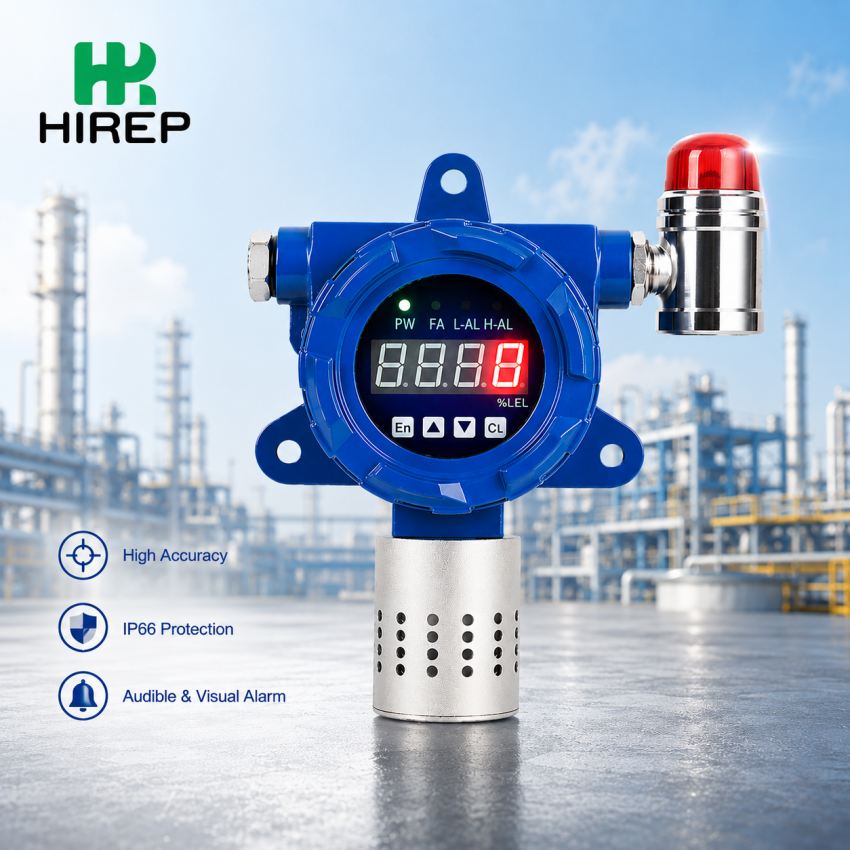
Stationary gas detector is an important equipment in industrial gas monitoring system, which can continuously monitor the concentration of specific gases in the environment. When the detected concentration reaches the preset alarm value, the instrument can remind the staff in time by means of digital display screen, acousto-optic alarm and so on.
In order to ensure the accuracy and stability of the test results, the fixed gas detector needs to be calibrated regularly. Among them, zero calibration is a very important operation in the daily maintenance and calibration of gas detector.
This paper will introduce the function, basic operation flow and problems needing attention in the zero calibration of fixed digital gas detector.
What is zero calibration of fixed gas detector?
Zero calibration refers to adjusting the reference point of the gas sensor under the condition that the target gas does not exist or the specified zero gas is used, so that the detector can correctly identify the zero state in the normal environment.
In the process of long-term use, the sensor may be affected by temperature, humidity, environmental changes, sensor aging and long-term operation, resulting in a certain zero drift.
For example, in the absence of target gas, the digital display screen still shows a small amount of gas concentration, which may be the performance of sensor zero drift.
By correctly calibrating the zero point, this reference deviation can be adjusted and the stability and accuracy of gas concentration detection can be improved.
Why do fixed gas detectors need zero calibration?
Correct zero setting is very important for the normal operation of gas detector.
First of all, zero calibration can help the detector get more accurate gas concentration readings. Secondly, the possibility of false alarm caused by zero drift can be reduced. At the same time, the correct zero point is also an important basis for subsequent range calibration.
Stationary gas detectors are widely used in chemical plants, oil and gas facilities, sewage treatment plants, industrial workshops, laboratories, storage areas and other places where continuous gas monitoring is needed.
Zero calibration steps of digital display fixed gas detector
1. Check the detector before calibration.
Before starting zero calibration, first check whether the fixed gas detector is in normal working condition.
Need to confirm:
- The power supply of the detector is normal;
- The gas sensor is connected normally;
- The digital display screen is normal;
- The instrument has no obvious fault prompt;
- The sensor has reached a stable working state;
- The current calibration environment meets the operational requirements.
If the detector has just been powered on, it should wait for enough preheating time according to the requirements of the product manual to make the sensor reach a stable state before calibration.
2. Confirm zero gas environment
When zero calibration is carried out, a suitable zero gas environment should be provided for the detector according to the type of detection gas and sensor.
Some applications can use clean air as the zero condition, while some sensors need to use the specified zero gas. The specific operation instructions provided by the gas detector manufacturer shall prevail.
Special attention should be paid to ensure that there is no target gas to be detected in the environment during zero calibration.
If zero calibration is carried out when the target gas actually exists, the detector may mistakenly take the current gas concentration as zero, thus affecting the subsequent detection results.
3. Enter the zero calibration menu.
Enter the parameter setting or calibration menu through the buttons on the detector, remote controller or other operation interfaces.
Find:
Zero Calibration (zero calibration)
Or:
Zero Setting (zero setting)
Different models of fixed gas detectors may have different menu names and operation modes, so the actual operation should refer to the operating instructions of the corresponding products.
4. Start zero calibration.
After confirming that the detector is in the correct zero gas environment, wait for the displayed value to be stable, and then start the zero calibration function.
The detector will establish a zero reference according to the current sensor output signal and adjust the zero parameter.
During calibration, the detection environment should be kept stable, and it is not allowed to move the instrument or change the gas conditions at will.
5. Check the zero calibration results
After zero calibration is completed, observe the digital display screen of fixed gas detector.
In the correct zero gas environment, the detection concentration should return to or remain in the range close to the expected zero value.
If the value is still obviously abnormal or fluctuates greatly after the calibration, it is not recommended to calibrate the zero point repeatedly, but the cause of the problem should be further checked.
Possible reasons include:
- Sensor aging;
- The wrong zero gas was used;
- The calibration gas flow rate is unstable;
- Influence of ambient temperature or humidity;
- The sensor is contaminated;
- Abnormal wiring or connection;
- The sensor is damaged.
What is the difference between zero calibration and range calibration?
Zero calibration and range calibration belong to different calibration operations.
Zero calibration is mainly used to establish the reference point of the detector when the target gas does not exist.
For range calibration, standard gas with known concentration is usually used to adjust the response value of the detector, so that the instrument display value is consistent with the standard gas concentration.
According to the detector model, sensor type, use environment and manufacturer’s requirements, a complete calibration process may require zero calibration and range calibration at the same time.
Common errors in zero calibration of fixed gas detector
Perform zero calibration in the environment with target gas.
This is a common problem in the zero calibration process.
If the target gas actually exists in the environment, direct zero calibration at this time may cause the detector to set the current gas concentration to zero incorrectly.
The detector is calibrated as soon as it is turned on.
The sensor may not have reached a stable state when it is first powered on. If zero calibration is performed immediately, the calibration result may be affected.
Therefore, the preheating time specified in the product manual should be followed.
Use inappropriate zero gas
Different types of gas sensors may have different requirements for zero gas conditions. Using the wrong zero gas may lead to inaccurate zero setting.
Ignore sensor failure
If the sensor has been obviously aged, polluted or damaged, it may not be possible to solve the problem just by zero calibration.
When encountering abnormal readings, check the working state of the sensor and the detector itself first.
How to keep the detection accuracy of fixed gas detector?
Zero calibration is only a part of the maintenance of fixed gas detector.
In the process of daily use, regular inspections should also be carried out according to the actual application environment and equipment requirements, including:
- Check the appearance and installation status of the gas detector;
- Check the working state of the sensor;
- Check the alarm function;
- Check the digital display screen display;
- Carry out zero calibration as required;
- Perform range calibration as required;
- Replace the sensor that has reached its service life in time.
The specific calibration period should be determined according to the sensor type, working environment, service time, gas exposure, manufacturer’s suggestion and relevant safety requirements.
By establishing a reasonable maintenance and calibration plan, it can help the fixed gas detector maintain stable detection performance.


 WhatsApp: 8619339980364
 E-mail: contact@hirepsafety.com